Table of Contents
Overview
At the moment, I’m helping a customer to migrate their OnPrem CVAD Farm to AVD. About 90% of the Workload is able to be put on Azure.
There’s around 10% who need to sit OnPrem. We evaluated RDS possibilities (With Broker, WebAccess, Gateway) but decided to choose Parallels RAS – mostly because of the Session-Host deployment options.
The Issue(s) we’ve found
So, the first User-Hop will be an AVD published Desktop, connected via Entra ID SSO. The second hop are published Apps via Parallels RAS, started from the AVD Desktop and targeting OnPrem Server 2025 Session-Hosts.
No Kerberos SSO to Parallels
As we’ve jumped into AVD with Entra ID SSO, there are no classic Credentials inside the session. Everything related to Authentication (Network Drives, Applications,…) is handled by the Cloud Kerberos Trust between Entra ID and the OnPrem Active-Directoy.
So what’s happening when starting the Parallels Client? Yep, it needs an Authentication with Username / UPN and Password. Not a great User-Experience, especially when you want to integrate the published Apps seamless in the AVD startmenu.
We’ve talked with some PM’s at Parallels – and they are listening carefully regarding that technical customer feedback, great Job! – it’s on the Roadmap to use Kerberos SSO to the Parallels Backend, but no ETA. A possible Workaround is to use SAML for SSO. Which brings us to the next limitation:
No Primary Refresh Token (PRT) when using SAML
Using SAML with Entra ID in a Parallels RAS World needs an Enrollment Server (ES) – yes, the technical Design is more or less the same as Citrix Federated Authentication Service (FAS).
So the SAML Token gets replaced by a virtual Smartcard Certificate from your PKI, using that for SSO to the Windows Server 2025 Parallels Session.
We’ve configured two Enrollment Servers and doing the technical implementation from the docs, created the Enterprise Application in Entra with the SAML config and switched the Auth on the Parallels Broker to SAML.
Now, the first issue is gone! The Parallels Client is doing a silent SSO via SAML with Entra and we are able to start our published Apps and Desktops, thanks to the Smartcard-Auth.
BUT, the joy didn’t last long, because OneDrive came up with “Please sign on”, and other M365 Apps, too. Wait a moment, we’ve used Entra ID CBA with the CVAD Site to gain a Primary Refresh Token (PRT) all the time. What is RAS doing here, as we are signing on to the Session-Host with a Smartcard, too – isn’t it?
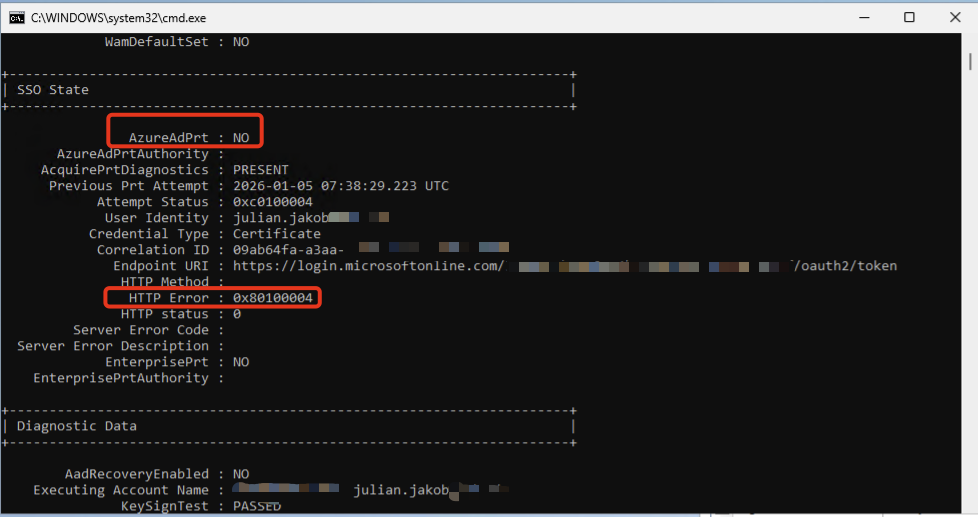
Technically, it’s not exactly the same design on how Citrix FAS and Parallels ES is working to handle to Logon. ES is using a NLA User. The purpose of this service account to initiate an RDP session to a host machine, receive logon error and trigger RAS credentials provider to supply user smart card. You can also see in Taskmgr that there’s a short try of logon of the NLA User.
That’s why there’s the HTTP Error 0x80100004, saying the Cert isn’t supported by Entra ID CBA. CBA fails and no PRT is issued.
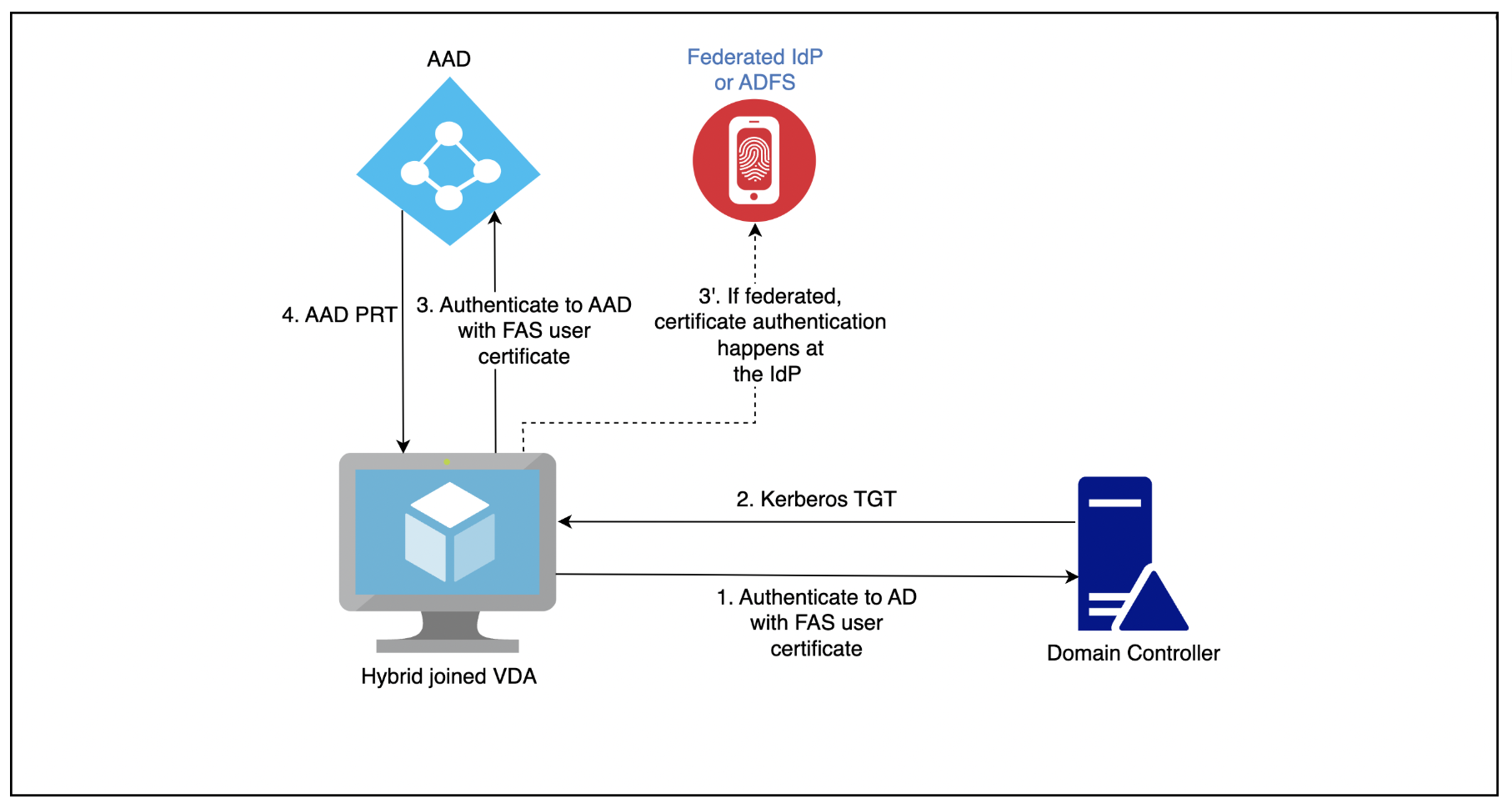
Citrix FAS is first authenticating to Active Directory with the FAS User-Cert, grabbing a TGT and during the logon mechanism, authenticating to Entra ID with the FAS User-Cert, resulting with a PRT:
Before anyone is commenting “Use Seamless SSO” you don’t need a PRT for M365 SSO – please read that one here. PRT is the modern way, Seamless SSO is unsecure by design (no one is rotating the Seamless SSO Service-Account AZUREADSSOACC Password often enough!)
Also, saving the Auth-Token from M365 to the FSLogix Profile is not an enterprise-ready solution.
Update 02.03.2026 – Fixed!
As written above, we were in active discussions with Parallels R&D team, checking how or where the limitation could come from, so no PRT is assigned.
Basically, it’s depending on the Cryptography Providers of the Parallels Smart-Card PrlsSmartcardLogon Cert-Template and Entra ID CBA.
According to the old Parallels KB it should be configured to use Microsoft Strong Cryptographic Provider – which will result in a failure of receiving a Primary Refresh Token (PRT) from EntraID:
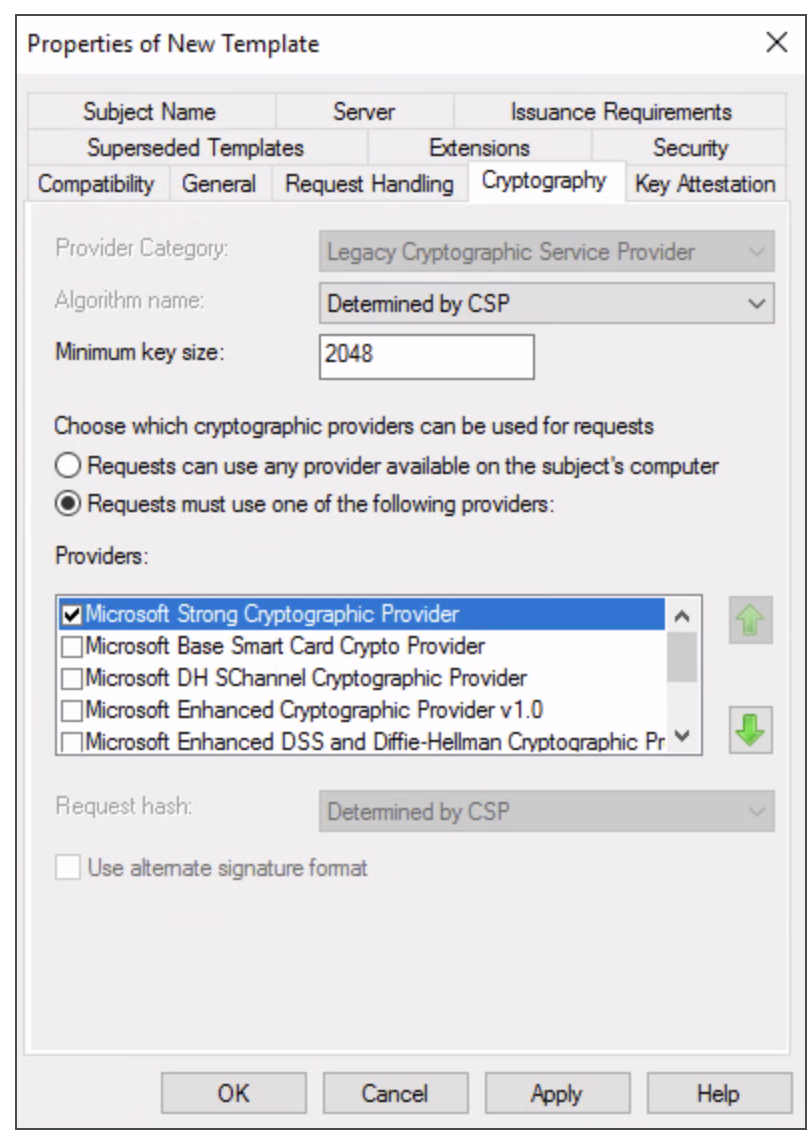
Now, the mentioned Article got an update.
Choose which cryptographic providers can be used for requests = Requests must use one of the following providers: Microsoft Enhanced RSA and AES Cryptographic Provider. When using SAML with EntraID and receiving in-session Primary Refresh Tokens (PRT) is needed, selecting “Microsoft Enhanced RSA and AES Cryptographic Provider” is required.
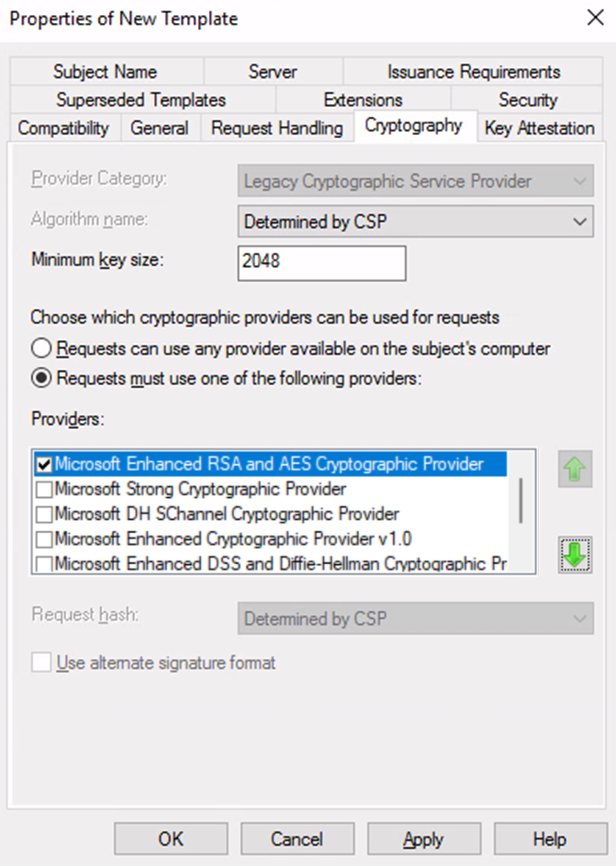
With that setting, receiving In-Session PRT is working fine.
But there’s a little problem with the Provider Microsoft Enhanced RSA and AES Cryptographic – it’s not todays security default and shouldn’t be used in the future.
Instead, use Microsoft RSA SChannel and DH SChannel Provider, based on Cryptography Next Generation (CNG), so the Template looks like this:
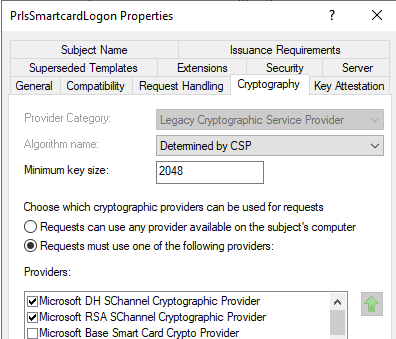
… resulting in an Error on the Parallels Enrollment Server (ES) Failed to create request for enrollment certificate of user XXX (Unknown cryptographic algorithm 0x80091002)
Which we’ve reported back to Parallels.
So at the moment (Will keep this Post updated) to receive an In-Session PRT, set the Template to “Microsoft Enhanced RSA and AES Cryptographic Provider”.
Overview
RAS is a great alternative in the EUC space, just lacking some features which are a basic requirement in the bigger enterprise-field. I hope it will be adopted in the near future. Please feel free to comment if there are any other workarounds.