Table of Contents
Overview
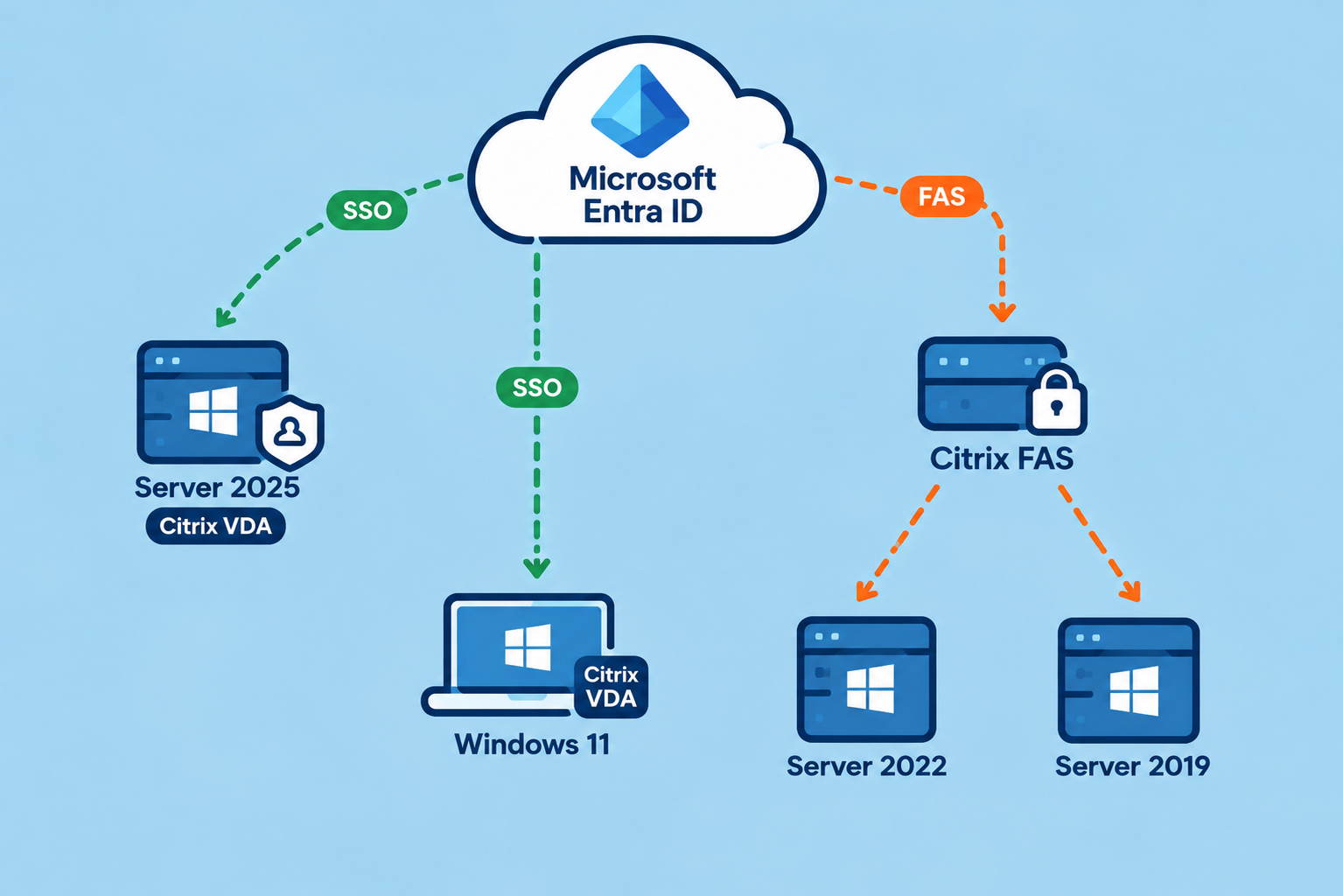
Everyones trying to get rid of FAS and implement Entra ID’s native SSO solution for Citrix DaaS Cloud or Citrix DaaS Local (GA since 2607 LTSR). The main requirements are Windows Server 2025 or Windows 11 as the VDA.
There are lots of Windows Server 2022, 2019 or even 2016 still alive in the wild, so what about a Co-existence, just the new method where it’s supported and reduce FAS to a minimum for the older Session Hosts.
There’s also an article from Citrix describing exactly that – but as there are some misunderstandings, I would like to clarify things here.
Configuration
The config for Entra ID SSO is documented here.
You can also go straight forward and switch to AzureAdSsoEnabled $True via PowerShell on your StoreFront Cloud – this will NOT enable Entra ID SSO or starting to break things for older VDA’s.
The Switch between Entra ID SSO and FAS has to be set per Delivery Group.
For Entra joined VDA’s:
asnp citrix*
Get-XDAuthentication
Get-BrokerDesktopGroup -Name <dgName> | Set-BrokerDesktopGroup -MachineLogOnType "AzureAd"
For Entra hybrid joined VDA’s:
asnp citrix*
Get-XDAuthentication
Get-BrokerDesktopGroup -Name <dgName> | Set-BrokerDesktopGroup -MachineLogOnType "HybridAzureAd"
Machine Identities
There’s also an important note regarding the Machine Identities of your Machine Catalogs. In Citrix Docs:
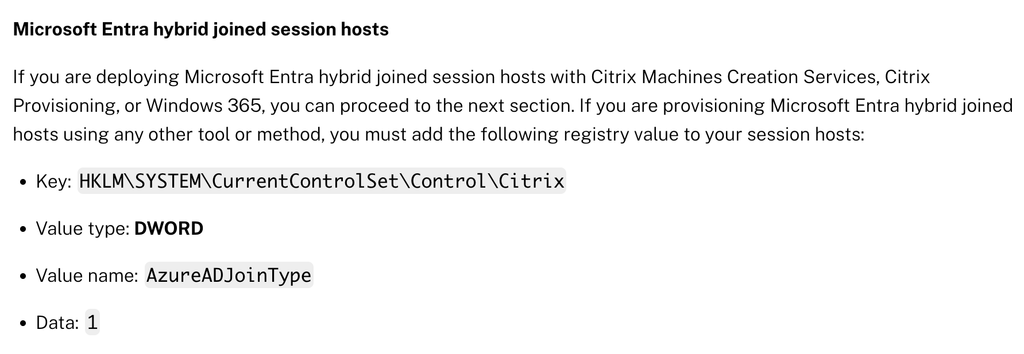
If you are deploying Microsoft Entra hybrid joined session hosts with Citrix MCS, PVS,… – you can proceed to the next section. So you don’t need the Regkey to be deployed on your VDA, right? Well, it depends.
During the creation of a Machine Catalog with MCS or PVS, there’s the point with Machine Identities, if you’ve created your Machine Catalog a while ago, it’s pretty common to set the Identity type to On-premises Active Directory – if that’s the case – you of course need the Regkey, independent if it’s MCS or PVS!
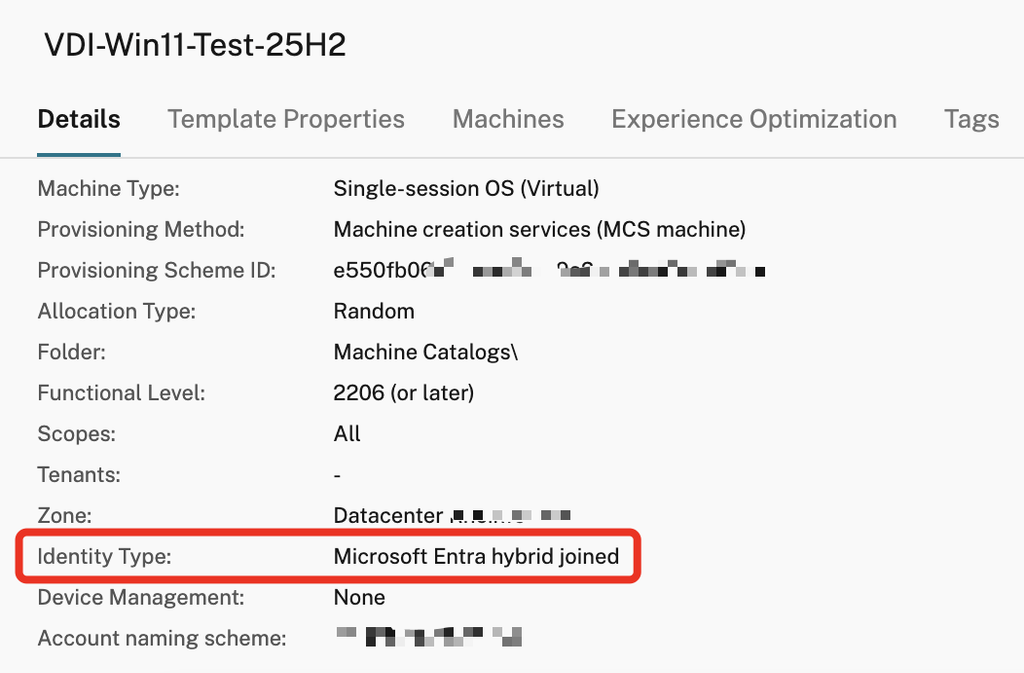
Alternatively, create a new Machine Catalog (you can’t switch Identity via PowerShell, you need to recreate) and choose Microsoft Entra hybrid joined as Identity type (For Entra joined VDI’s you need to configure a Machine Profile):
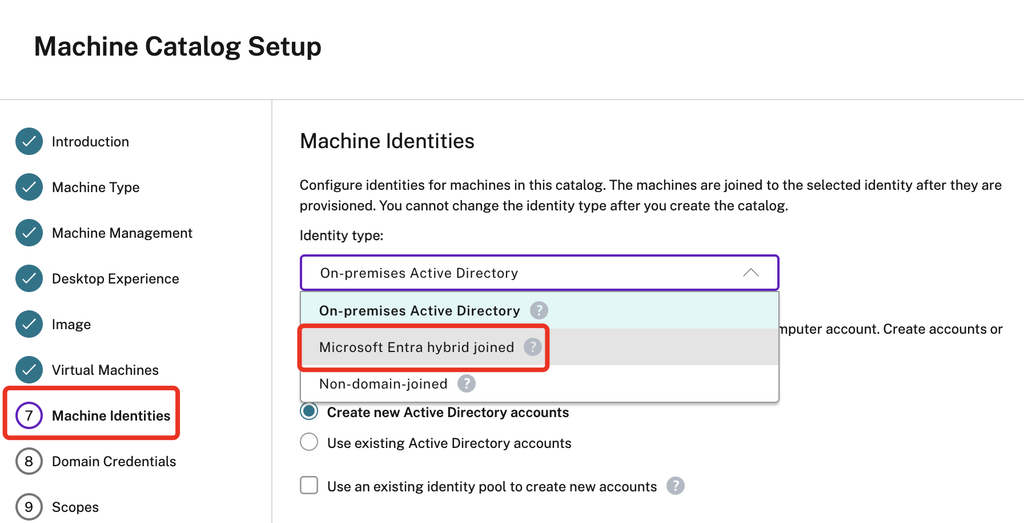
Why am I recommending that, instead of pushing the Regkey? That Setting has also another positive side-effect. The VDA will wait for registration to complete, depending on the Hybrid joined state.
When rebooting a non-persistent VDA, the registration can take a bit longer than you’re used to and you can see this warning here:
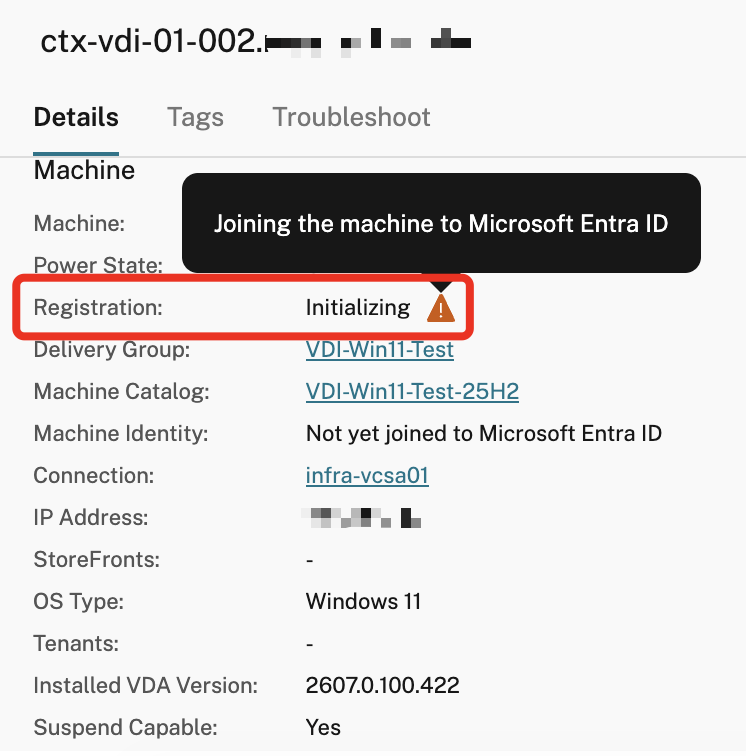
So the VDA now checks the hybrid joined state and will finish registration once the join is complete. That’s a neat little feature, who wants User’s to connect to a VDA with failed hybrid join? No-one, because of SSO-issues to the HDX-Session and also to M365 Services. If a VDA will not complete it’s hybrid join, it will never register, that’s nice. So you can also track hybrid joined VDA issues via Studio.
If you’re not sure which Identity type you chose for your Catalogs, checkout on the Details:
FAS Co-existence
As written above, the -MachineLogOnType, set per Delivery Group, will bring the switch between EntraID SSO and FAS.
After I did that to one Delivery Group, also unbound the FAS GPO, I noticed Application Event ID 105 (Issued Identity Assertion for User with UPN user@contoso.com) is still triggered on my FAS Servers during Logon, even if my Users are doing SSO with EntraID SSO, not even FAS.
That’s because FAS is enabled per Resource Location in DaaS, so it will hit all the time and still issuing the Smartcard Certs – but it’s not getting used by the VDA. We’ve checked that with revoked and deleted Smartcard Certs for some Users, shutdown FAS services and restart some Sessions.
You can validate that – your VDA with EntraID SSO enabled should never log any Application Event ID 106 (Identity Assertion Logon for User user@contoso.com with Certificate of CA Contoso) during User-Logon – so the FAS-Smartcard-Cert isn’t used, anymore – which is our goal.
I just wanted to mention that here, because it can be confusing during the migration from one to the other solution.
To conclude
- The -MachineLogOnType Switch per PowerShell per Delivery Group will decide if EntraID SSO or FAS is used.
- Every HDX Session-Request will trigger an Event ID 105 on FAS Servers “Issued Identity Assertion”, although EntraID SSO is used by that User, even if you unassign the FAS GPO of newer VDA’s. That’s because FAS is enabled on your Resource Location in general.
- If you want to check Sign-In Logs of EntraID SSO, see the Sign-in logs of the Enterprise App Citrix-Workspace-Resource on Entra.
- Your Conditional Access Policies for Citrix-Workspace-Resource App should be identical to the previous used Citrix Cloud Enterprise App.
- When FAS is used for the User’s Session-SSO, check for Event ID 106 on the VDA. On Server 2025 or Windows 11 with enabled Entra ID SSO, you should never see such Event ID.
- Deploy the Regkey DWORD AzureADJoinType to your Server 2025 / Win11 Master-Image or even better, Re-Create the machine catalog with Identity Type set to Hybrid joined or a Machine Profile (required for Entra joined VDA’s). For persistent Catalogs, use the Regkey.
Summary
I hope this Quickpost gave you the needed technical informations for deploying both SSO methods in Co-existence.