Table of Contents
Overview
Microsoft is going to change the default behaviour on how Conditional Access Policies are enforced for Applications requesting only OIDC Scopes or a limited set of directory scopes – because of strenghten Entra ID’s security. Depending on your Conditional Access Policies, your Users might be able to not sign in, anymore!
Am I affected and what exactly is changing? Why are Applications like Citrix DaaS or NetScaler affected (In general way more!). Lets get into it.
And yes, I got aware of that the cold way, a customer informed me the day after, their Entra ID Tenant got updated to the new Baseline enforcement and no BYOD-User was able to logon to Citrix DaaS… 🙂
What is changing?
Today, when a user signs in through a client application that requests only OIDC scopes or a limited set of directory scopes, Conditional Access policies that target All resources are not enforced if the policy has one or more resource exclusions.
After this change, Conditional Access policies that target All resources will be enforced for these sign-ins, even when resource exclusions are present. This ensures that policies are consistently applied regardless of the scope set requested by the application.
So to be clear, a typical example for Citrix DaaS / NetScaler Application usage on Entra / Conditional Access:
A Conditional Access Policy, targeting All Resources, require a Hybrid joined Device and/or a compliant Device, but set the Citrix DaaS Application as excluded had the goal to be able to use BYOD (Non-Compliant) devices to sign in to Citrix DaaS. Important for external contractors / consultants with unmanaged Devices. Was working fine for years.
After the change, the exclusion will not be excluded, anymore. So all BYOD and external contractors aren’t able to sign-in, as their device isn’t compliant.
Why this needs to be changed?
The gist of it is, if you ever exclude just one resource from your Conditional Access policy, the following resource/scope combinations are no longer covered by this policy – called the Baseline Scopes:
Azure AD Graph: email, offline_access, openid, profile, User.Read
Microsoft Graph: email, offline_access, openid, profile, User.Read, User.Read.All, User.ReadBasic.All, People.Read, People.Read.All, GroupMember.Read.All, Member.Read.Hidden
While this doesn’t sound like much, it means that access to your Entra data that contains extended information about the user itself, is no longer as protected as you might have intended, even if you excluded a completely different resource in the first place.
To get a better understanding of the bypass possibilities, checkout this Blogpost from Fabian Bader.
To be clear: When using Citrix DaaS with the integrated native Entra ID Auth (the new Microsoft Entra single sign-on is affected, too (which is OIDC) or NetScaler Gateway connected to Entra ID via OAuth Action (which is OIDC) and you are filtering this Enterprise Apps (App Registrations) on your Conditional Access Policies targeting “All resources” with one or more exclusions (doesn’t matter if that Citrix App is the exclusion itself or any other App) you are affected by the change. SAML isn’t affected, as SAML-based Enterprise Apps always were treated regularly by Conditional Access.
Why are these Apps affected in general? Because they all are requesting Microsoft Graph for User.Read Claim via OIDC as a minimum requirement:

Details about the changes from MS-Blogs here where there’s the following important note:
Note: We’ve adjusted the rollout timeline, with enforcement now starting on June 15, 2026. To support a smooth transition, customers will receive additional details and guidance through Microsoft 365 Message Center messages.
Important Note: This change only affects tenants that have a Conditional Access policy targeting All resources with one or more resource exclusions, and these tenants will be notified through M365 Message Center messages. Tenants without this policy configuration will not be impacted.
In other words:
This change affects your tenant if all of the following conditions are true:
- You have one or more Conditional Access policies that target All resources.
- Those policies have one or more resource exclusions.
- Users in your tenant sign in through applications that request only baseline scopes.
If your policies target All resources without any resource exclusions, this change doesn’t affect you.
The Message-Center ID is MC1440566, here’s an example within one of my customers tenant:
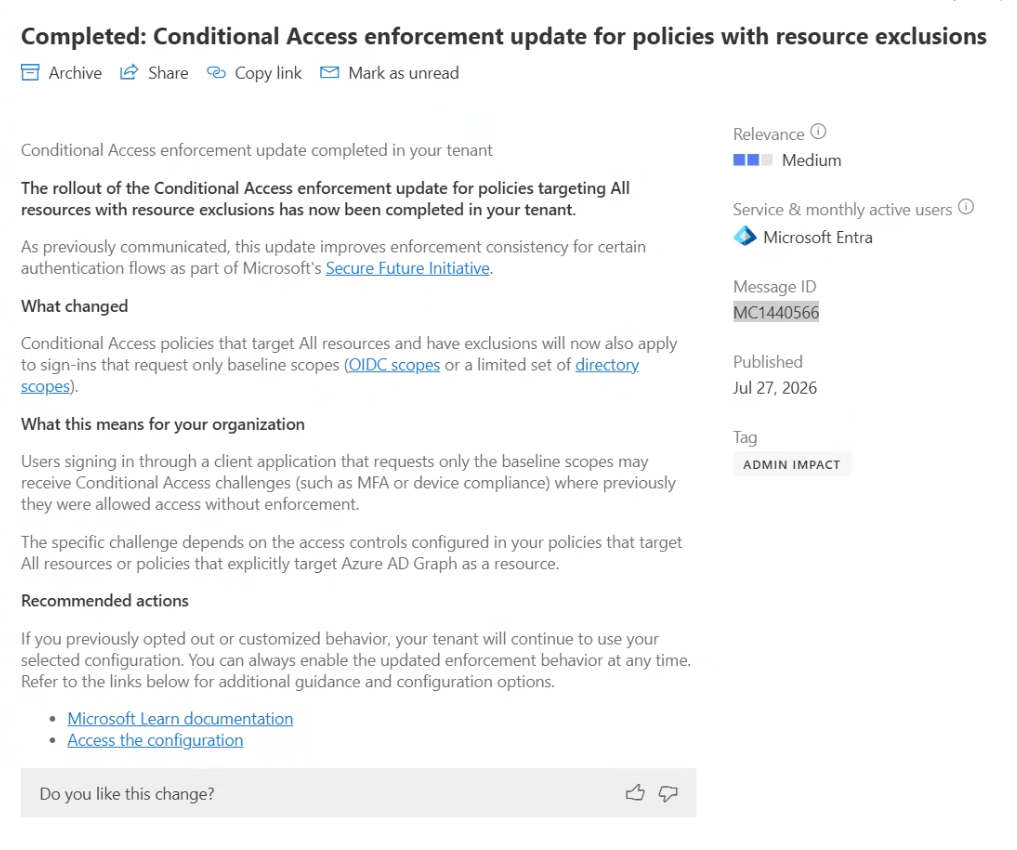
When the change is targeted for your Entra ID tenant, you will see a new Setting called Baseline scope settings:
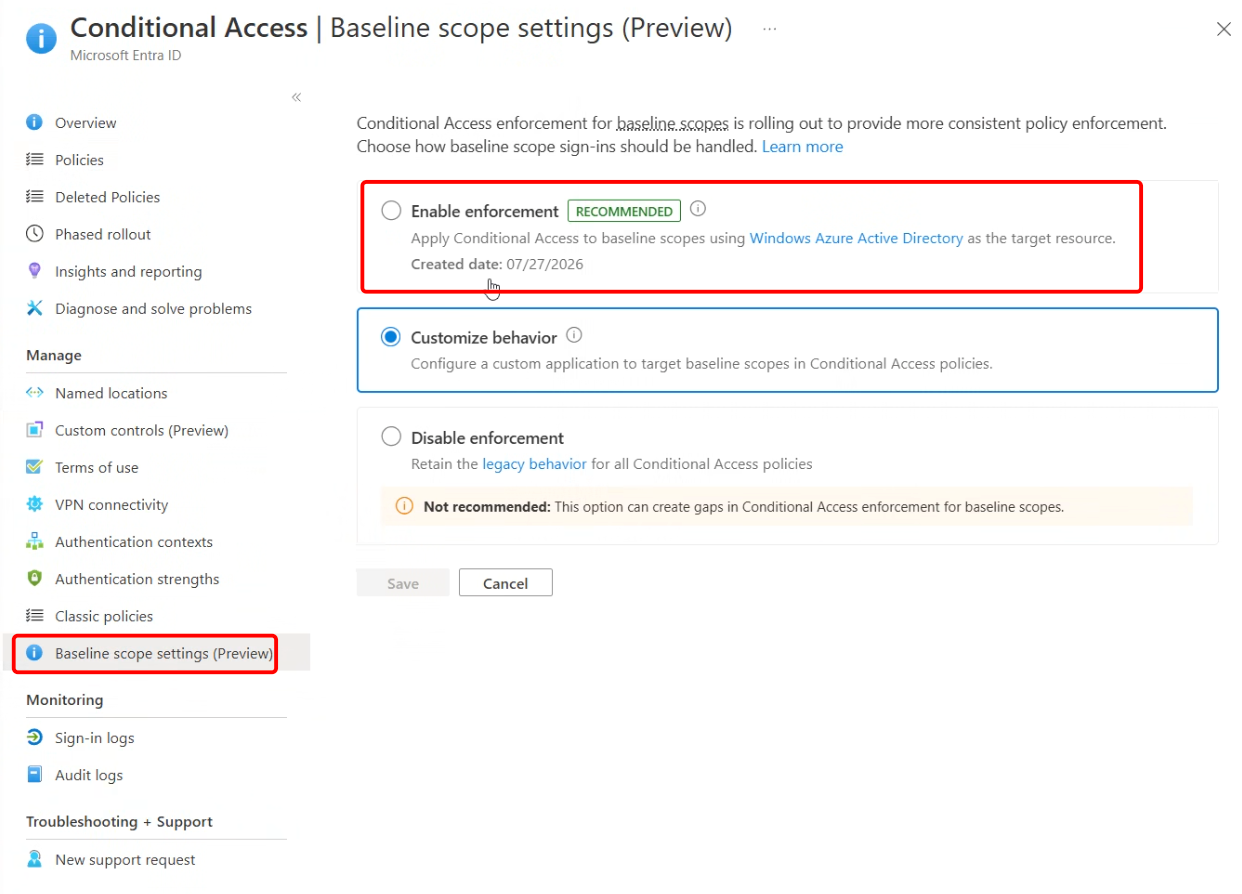
Here’s the matching MS-Learn article about what the baseline scopes are and answering the important W-Questions.
What to do?
Review and check your Conditional Access Policies and Applications, do you use All resources as a target? If so, check your exclusions and if they are important for your Logon / Access-Design. Maybe rethink your Architecture or filtering possibilities.
Are these excluded Applications only requesting above listed baseline scopes?
Here’s a perfect example of a NetScaler Application which is affected by the change, because only three scopes are requested, and all three are affected of the change:
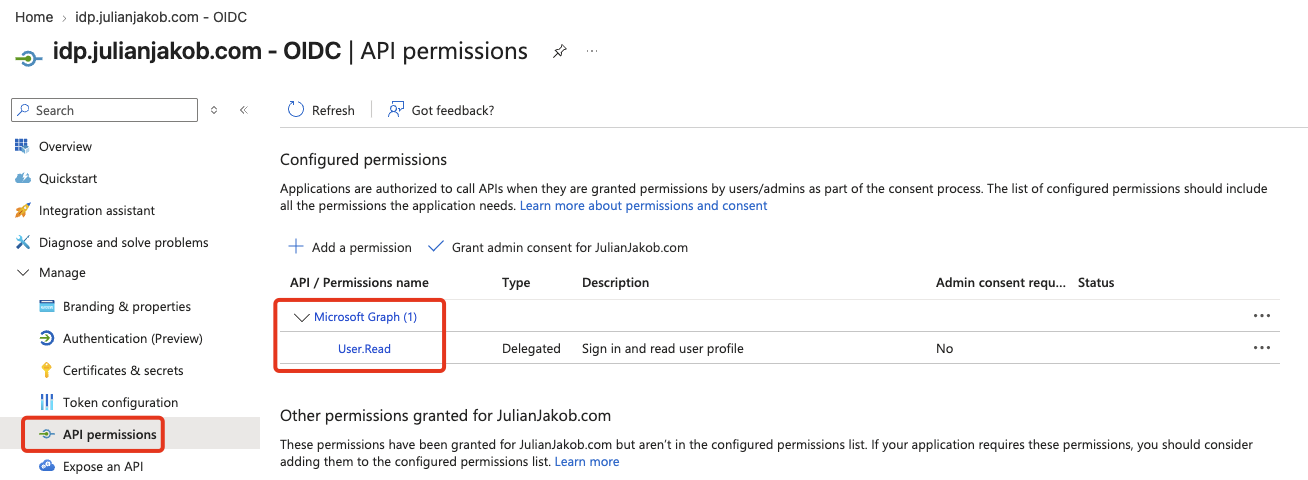
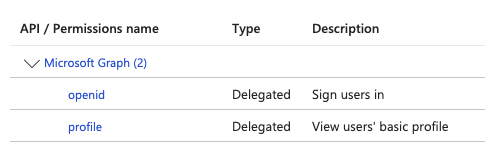
If just one scope NOT from the baseline is requested, the Application isn’t affected by the change and was already enforced by Conditional Access.
Another example is Citrix’ new “Microsoft Entra single sign-on” which deploys two App Registrations in your Tenant:
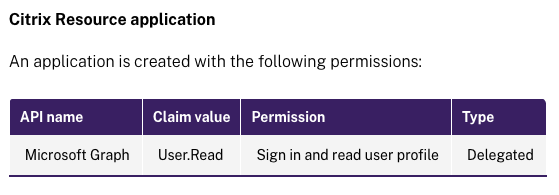
…which is affected by the change, because only using MS-Graph with User.Read scope!
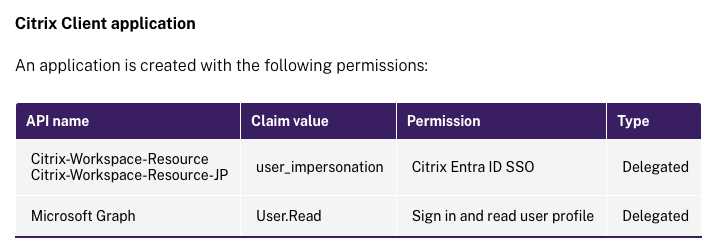
…which is not affected by the change, because not only using MS-Graph with User.Read scope, adding another claim user_impersonation.
Summary
An important change for highen up Entra ID’s security, which can cause unexpected authentication issues, depending on your Conditional Access setup.
Thanks, I’ve forwarded this article directly to my collegues, nice work!