Table of Contents
Overview
Protecting an authenticated User’s Session is very important in todays world. Hijacking an active Session is nothing new, taking over an existing session is the golden ticket for unwanted access, regardless of the MFA methods.
In 2024, NetScaler introduced a new expression called AAA.USER.SOURCEIP to check for existing sessions and a match of the Source-IP. Access got denied with Responder. All details and how to reproduce the issue, see here.
The biggest painpoint of such User-Expressions are with corporate Proxy or NAT. As NetScaler isn’t able to get the real IP of the Enduser (everyone is using the same Source-IP), the Cookie Hijack Protection was useless, because it hits all the time and denies access to your users.
Now, these environments get protection, too.
Configuration
NetScaler’s 14.1 Build 66.54 introduces an important improvement – Client IP address validation using X-Forwarded-For (XFF) in AAA sessions
Release-Notes:
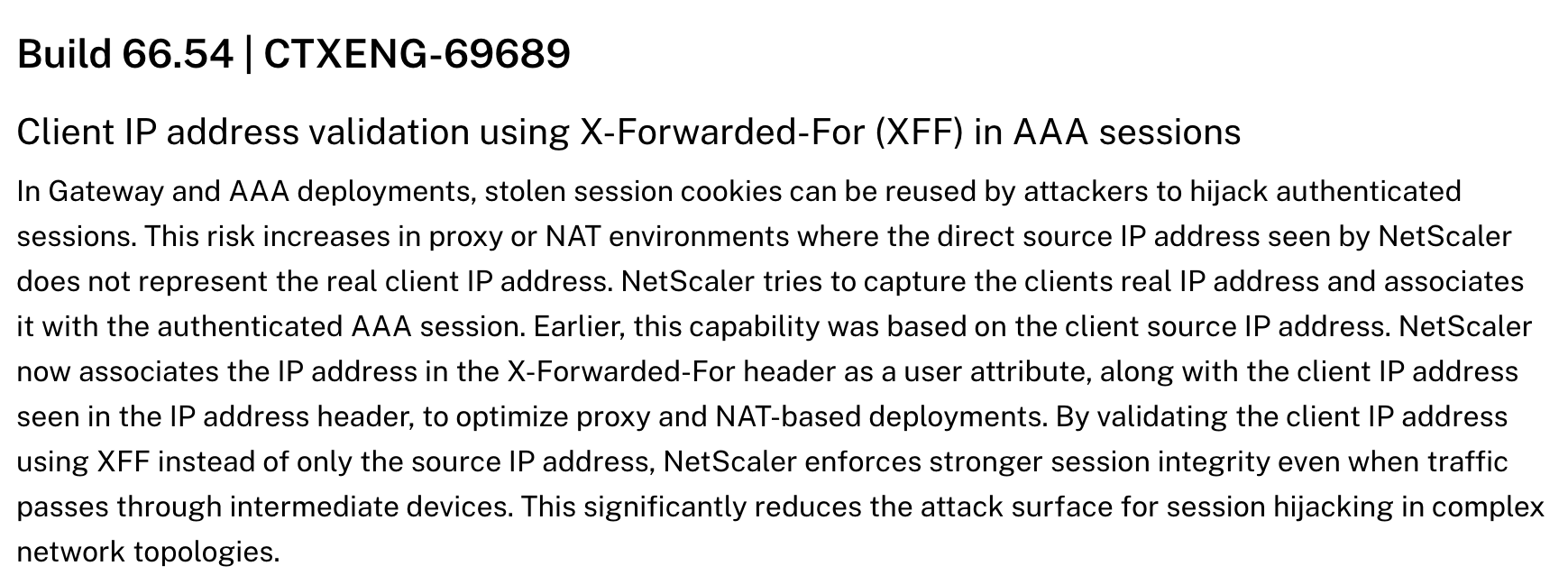
Let’s see which config-options and new Expressions there are and how to use it.
Source-IP based Protection (already introduced with 14.1 25.x / 13.1 53.x):
AAA.USER.NAME.LENGTH.NE(0)&&AAA.USER.SOURCEIP.NE(CLIENT.IP.SRC)
X-Forwarded-For (XFF) based Protection (new with 14.1 66.54)
AAA.USER.NAME.LENGTH.NE(0)&&AAA.USER.XFFIP.NE(CLIENT.IP.SRC)
X-Forwarded-For (XFF) with stored Client-IP-Validation based Protection (new with 14.1 66.54)
AAA.USER.NAME.LENGTH.NE(0)&&AAA.USER.VALIDATE_CLIENTIP.NOT
Which Expression should I use?
Validate headers
First, you have to make sure your NetScaler gets the needed X-Forwarded-For (XFF) header, sent by the System which sits in front of (Firewall, Proxy, other LoadBalancers,…)
Two easy options to validate that. (Tip: Use both to get a 100% Validation)
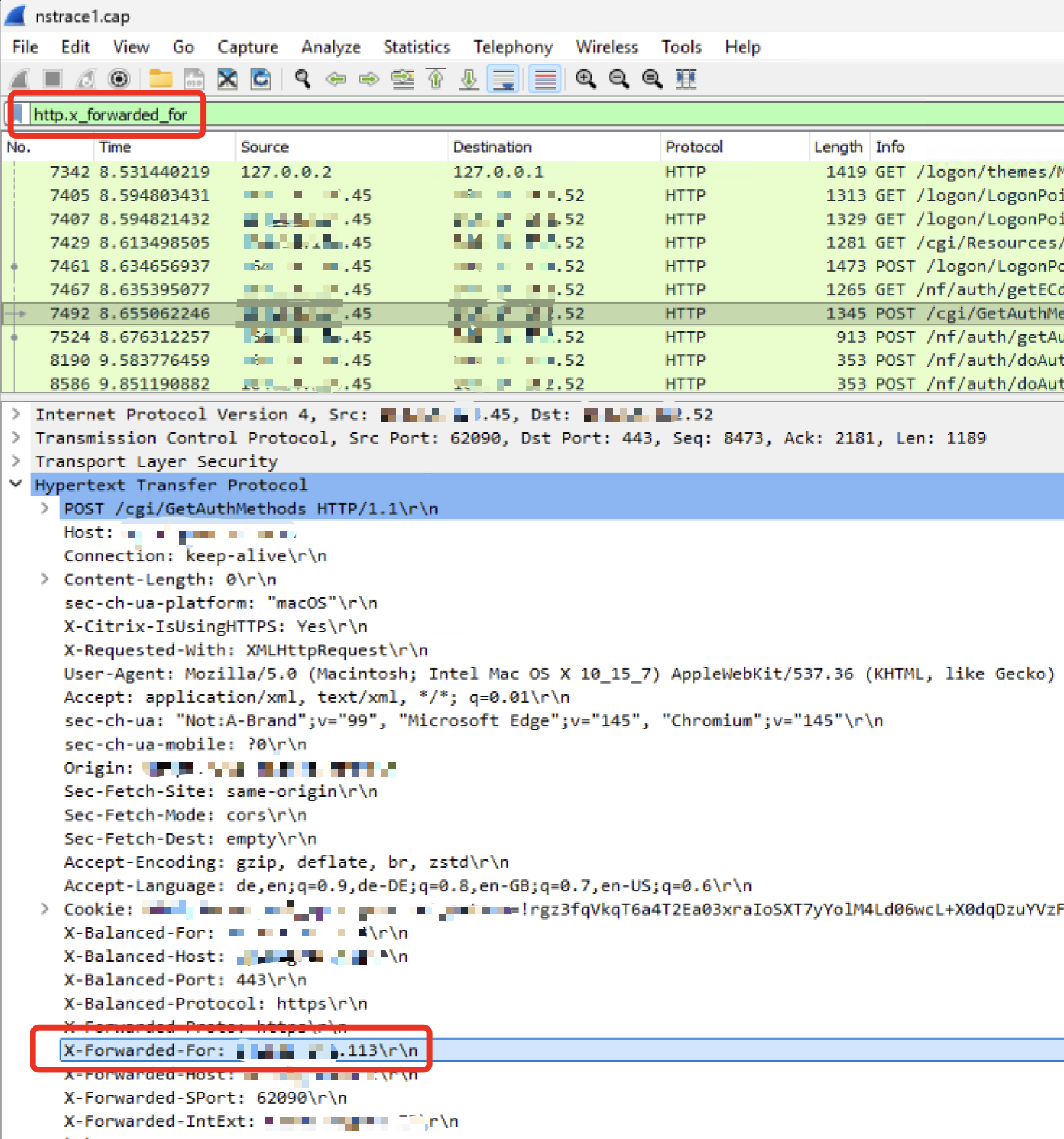
- Wireshark trace on NetScaler, get some traffic and search for http.x_forwarded_for and validate the X-Forwarded-For header contains real public IP’s from your users mobile / home office. This validates there is some X-Forwarded-For traffic sent to your NetScaler.
2. Another method (without traces needed) is to create just a Logging-Responder Policy to validate the AAA.USER.XFFIP expression informations. This validates, the above validated X-Forwarded-For traffic is received AND read correctly (insert to the correct attribute) by NetScaler:
######Creates a responder policy just for logging and validating the AAA.USER.XFFIP expression, to check if NetScaler receives XFF header through NAT / Proxy
###replace nsgw.customer.com_NSGW with your NSGW vServer
###replace aaa.customer.com_AAA with your AAA vServer
###when NSGW or AAA is behind a Content Switch, remember to bind the Responder Policy to the CS vServer, too

set audit syslogParams -userDefinedAuditlog YES
set audit nslogParams -userDefinedAuditlog YES

add audit messageaction log_XFFCheck NOTICE "\"Logged X-Forwarded-For Informations with XFF IP \" + AAA.USER.XFFIP + \" who is \" + AAA.USER.NAME + \" who tried to access \" + HTTP.REQ.HOSTNAME + HTTP.REQ.URL.PATH_AND_QUERY" -logtoNewnslog YES
add responder policy RespPol_LogXFF true NOOP -logAction log_XFFCheck

bind vpn vserver nsgw.customer.com_NSGW -policy RespPol_LogXFF -priority 10 -gotoPriorityExpression END -type REQUEST
bind authentication vserver aaa.customer.com_AAA -policy RespPol_LogXFF -priority 10 -gotoPriorityExpression END -type AAA_REQUEST
So you get a clear log-information in your ns.log:
“Logged X-Forwarded-For Informations with XFF IP 192.168.10.1 who is HDXLAB\julian who tried to access nsgw.customer.com/Citrix/ctx_prdWeb/”
According to the docs, VALIDATE_CLIENTIP is the best option with highest compatibility in both cases. XFF IP stored at authentication with the one seen during access, falling back to source IP if no XFF info is available.
So when there’s no XFF information available, an auto-fallback to CLIENT.IP.SRC will happen. But watch out in environments (like that example here) where NetScaler will always see the same static CLIENT.IP.SRC (Firewall, Proxy, Other LB / Reverse Proxy in front of) – when the Fallback to CLIENT.IP.SRC happens, every Login-attempt gets directly redirected to logoff!
Issue with NetScaler Gateway vServer (ICA-Proxy)
So, with AAA.USER.SOURCEIP back in 2024, we can use the same expressions to protect AAA vServer Deployments and NetScaler Gateway vServer (ICA-Proxy) scenarios, too – correct? At the moment, NOPE!
The mentioned NetScaler article says “…for AAA sessions” and that’s correct. The initial expressions were built for AAA session protection (Eg Exchange OWA, protected by AAA) – not for NetScaler Gateway / ICA-Proxy.
I tried the same setup for an ICA-Proxy environment, where a NAT-Proxy is in front of, so NetScaler always sees one public IP (the Proxy) for all User-Sessions.
As soon as I’ve configured XFFIP validation, every auth-attempt got directly redirected to the logoff page. I did some further investigation with traces and NetScaler Engineering (Thanks for the great teamwork here!) and they’ve confirmed, the XFFIP / VALIDATE_CLIENTIP were built from the AAA Team and they didn’t considered ICA-Proxy setups.
Because ICA-Proxy is doing something special compared to AAA sessions. Currently, ICA-Proxy scenario adds two IP’s in the XFF Header. The first one is the correct XFF Client-IP, the second is some kind of loopback communication.
So for NetScaler Gateway ICA-Proxy, there’s a workaround expression built for grabbing the correct XFF-IP and do the match:
HTTP.REQ.HEADER("X-Forwarded-For").COUNT.EQ(2)&&AAA.USER.XFFIP.NE(HTTP.REQ.HEADER("X-Forwarded-for").Value(1).TYPECAST_IP_ADDRESS_T)
According to Engineering, ICA-Proxy Team will work on a final fix in a future Firmware-Build, so the Expression will be simpler than that.
CLI final Config
Here’s the final CLI config for enabling the feature, using XFFIP Expression for ICA-Proxy Gateway (Workaround) and VALIDATE_CLIENTIP for AAA-TM, set a message-action for your Logs and binding to your NSGW / AAA vServers:
#######Update 14.04.26, with Firmware 14.1 66.54 it's possible to use X-Forwarded-For (XFF) for environments with Proxy or global NAT (where NS isn't able to see the real Source-IP of the Users)
###For IPv6, use AAA.USER.XFFIPV6.NE
###When NSGW or AAA is behind a Content Switch, remember to bind the Responder Policy to the CS vServer, too. Otherwise it will never hit.


set audit syslogParams -userDefinedAuditlog YES
set audit nslogParams -userDefinedAuditlog YES

add audit messageaction log_XFFCookieHijack NOTICE "\"Redirected to Logoff because of Hijack Protection for \" + AAA.USER.SOURCEIP + \" with XFF IP \" + AAA.USER.XFFIP + \" who is \" + AAA.USER.NAME + \" who tried to access \" + HTTP.REQ.HOSTNAME + HTTP.REQ.URL.PATH_AND_QUERY" -logtoNewnslog YES


###For AAA TM protected vServers
###Replace aaa.customer.com with your public AAA FQDN
###Replace aaa.customer.com_AAA with your AAA vServer
add responder action RespAct_SessionHijack redirect "\"https://aaa.customer.com/cgi/tmlogout\"" -responseStatusCode 302
add responder policy RespPol_SessionHijack "AAA.USER.NAME.LENGTH.NE(0)&& AAA.USER.VALIDATE_CLIENTIP.NOT" RespAct_SessionHijack -logAction log_XFFCookieHijack
bind authentication vserver aaa.customer.com_AAA -policy RespPol_SessionHijack -priority 10 -gotoPriorityExpression END -type AAA_REQUEST


###Workaround for NetScaler Gateway Deployments, Fix tba with Firmware Update, soon
###Replace nsgw.customer.com_NSGW with your NSGW vServer
add responder action RespAct_SessionHijack redirect "\"/cgi/logout\"" -responseStatusCode 302
add responder policy RespPol_SessionHijack "HTTP.REQ.HEADER(\"X-Forwarded-For\").COUNT.EQ(2)&&AAA.USER.XFFIP.NE(HTTP.REQ.HEADER(\"X-Forwarded-for\").Value(1).TYPECAST_IP_ADDRESS_T)" RespAct_SessionHijack -logAction log_XFFCookieHijack
bind vpn vserver nsgw.customer.com_NSGW -policy RespPol_SessionHijack -priority 10 -gotoPriorityExpression END -type REQUEST
Summary
A great work further to protect NetScaler’s user-sessions. Is it now a 100% protected? No, never, but an important step near better security.
Are there still some limitations? Yes, there are:
- Session cookie theft from the same client IP address cannot be detected
- Replayed or forged XFF headers might bypass validation
- XFF tampering can result in denial-of-service for valid users
- This feature reduces risk but does not eliminate all hijacking scenarios
In the ICA-Proxy scenario, do you also have a decrypted trace, so we can see what it looks like when there are 2 XFF headers.
Yes, NetScaler Engineering did also a trace in their Lab, it looks like this example here:
GET /api/resource HTTP/1.1
Host: example.com
X-Forwarded-For: 192.168.1.100
X-Forwarded-For: 10.0.0.50
Content-Type: application/json
The first XFF IP is the real Client-IP.
Hi Julian
Thanks for this, a great write up. There is a typo… Because ICA-Proxy is doing sth special compared..
It’s ’something’ I expect. 😀
Thanks
Andrew
Thanks Andrew, it’s fixed now.
Thanks for the tutorial.
For the Logging Responder Policy test with Netscaler Gateway this showed me the correct IP in den Log:
“Logged X-Forwarded-For Informations with XFF IP ” + HTTP.REQ.HEADER(“X-Forwarded-For”).REGEX_SELECT(re/^[0-9a-fA-F.:]+/) + ” who is ” + AAA.USER.NAME + ” who tried to access ” + HTTP.REQ.HOSTNAME + HTTP.REQ.URL.PATH_AND_QUERY